
AdCreative.ai is a tool for producing ad creatives: it uses AI to generate banner images, ad copy, product photos, videos, and more for advertising. This article walks through its features, pricing, terms of use, and where it does and doesn't fit, based on what we found on the official website, the help center, and the terms of service for online subscribers on October 4, 2026 (UTC).
What is AdCreative.ai?
AdCreative.ai lets you register your logo, brand colors, fonts, and similar assets as a "brand," then generates ad creatives in multiple sizes based on it. According to the terms of service, the service is provided by companies in the Appier group, including ADYOUNEED SAS, and the company you contract with is determined by the record of your online transaction.
The official website groups its features into four areas: Generate, Analyse, Predict, and Automate.
Main features
These are the main features we confirmed on the official website and in the help center:
- Ad creative generation: generates banners in different sizes for each ad platform, based on your brand information
- Ad copy generation: reads a website URL to draft headlines and body copy, which you can edit on screen
- Product and fashion photos: replaces the background of product photos and fits clothing onto AI-generated models
- Video generation: one feature turns product photos into product videos or UGC-style videos, and another creates story-style ad videos
- AI image generation and helper tools: stock-photo-style image generation, plus the Creative Utility Suite, which bundles tools such as background removal and upscaling
- Instant Ads and Buyer Personas: a feature that generates ads from a web page URL, and a feature that generates buyer profiles (personas)
- Analytics: Creative Insights analyzes data from connected ad accounts, Competitor Insights analyzes information from competitors' sites, and Compliance Checker checks conformity with ad policies and similar rules
- Creative Scoring AI: shows a score that predicts the performance of ad images you upload
What creative scores can and can't tell you
According to the help center, Creative Scoring AI calculates two scores: a "Performance Score" that predicts click-through rate (CTR) and an "Awareness Score" that estimates the impact on brand recall. It can evaluate up to 25 images at a time, and it also shows heatmaps of the areas likely to draw attention, along with suggestions for improvement.
We don't cover the prediction-accuracy figures and similar numbers published on the official website, because they are the provider's own claims. The scores are only predictions, so you still need to check them against actual campaign results (editor's view).
Connecting to ad platforms
The help center explains that once you connect an ad account to a brand, you can send (push) the creatives you generate to that ad account. The sample screen on the AI image generation page shows buttons for sending to Meta Ads, Google Ads, and LinkedIn Ads, but we could not find any official list of the ad platforms that can be connected. The help center also states clearly that pushed creatives are only added to the destination's media library; AdCreative.ai does not launch ads automatically.
You can use the generation features without connecting an ad account. However, without a connection you can't send creatives directly, and you also don't get the more personalized suggestions and scoring that learn from your past campaign results.
How pricing and credits work
Credits are mainly used when you download
According to the pricing FAQ on the official website, credits are used when you download a creative you've generated, and generation itself is unlimited. Credits are granted every month, but the terms of service state that unused credits do not carry over to the next month. You can also buy additional credits for an extra fee.
Note, however, that the terms of service define credits as something that may be consumed, one or more at a time, for "generation or download," and the free trial information also describes the 10 credits as usable for "generating." Because consumption may differ by feature, check the in-app display before using heavier features such as video.
Plans and prices
Prices are listed in the pricing section of the official website's homepage. As of October 4, 2026 (UTC), the pricing table shown without logging in listed the following (in US dollars, with each plan's default number of credits selected):
- Starter: $39 per month on monthly billing, 10 credits per month, 1 brand, 1 user
- Professional: $249 per month on monthly billing, 50 credits per month, 10 brands, 10 users
- Ultimate: $999 per month on monthly billing, 100 credits per month, 25 brands, 20 users
- Enterprise: custom quote (described as including a dedicated contact person and customization using your own data)
Each plan also offers configurations with a different number of monthly credits through a dropdown menu, and the price changes accordingly. Professional and Ultimate are marked "Pro Features," but we could not determine from the pricing table which plans include Creative Scoring AI, the video features, custom templates, and so on.
Besides monthly billing, the table shows "quarterly (25% off, billed every quarter)" and "yearly (50% off, billed once a year)." The effective monthly prices shown in the pricing table are:
- Quarterly: Starter $29, Professional $185, Ultimate $749
- Yearly: Starter $20, Professional $125, Ultimate $500
These are rounded effective monthly figures for display, and they don't fully match the crossed-out prices or the displayed discount amounts. The actual quarterly and yearly invoice amounts are not stated on the public page, so don't work them out backward from the monthly figures. The discounts are those displayed at the time and may change. Also, the terms of service describe billing cycles as monthly or annual and say nothing about quarterly billing. If you sign up, check the final amount and conditions on the checkout screen, including taxes and any regional differences.
Free trial
The official website advertises a "7-day free trial" and says you get 10 credits during the trial. According to the help center, you must enter a credit card when you sign up, and you are not charged during the 7-day trial. The explanation also assumes that you will be charged if you don't cancel before the trial ends. We couldn't find a permanent free plan in the pricing table, so continuing after the trial means moving to a paid plan.
Cancellation, refunds, and automatic renewal
These are the main conditions we confirmed in the terms of service and the help center:
- Automatic renewal: your subscription renews automatically on the same terms for each billing cycle. The Japanese version of the terms says you must cancel at least 7 days before the end of the monthly period for monthly billing, and at least 30 days before the renewal date for annual billing. The English version uses wording that could also be read as "within 7 days before the end date," so the two versions don't mean the same thing.
- How to cancel: according to the help center, if you request cancellation from the settings screen in the app, the cancellation takes effect at the end of the current billing period. Immediate cancellation requires contacting support.
- Refunds: under the terms, there is no right of withdrawal after you subscribe. However, if you have not used the service at all and a written request reaches the provider by email within 7 days of sign-up (monthly billing) or within 30 days (annual billing), the provider may issue a refund at its discretion. The pricing FAQ likewise makes not having generated or downloaded anything a condition. On the other hand, the help article about credit cards describes a "100% refund" within 7 days (monthly) or 30 days (yearly) of being charged after the trial, without mentioning any non-use condition.
- Price changes: the provider can change its prices, and changes apply after the end of your current billing cycle.
As this shows, the Japanese and English versions of the terms, the pricing FAQ, and the help center don't agree on the details. The terms also don't specify cancellation or refund conditions for quarterly billing. If you have concerns, confirm with support before subscribing.
Commercial use and generated output
Because this is a tool for advertising, it's worth checking how its terms treat your use in advance. These are the main points we confirmed in the terms of service for online subscribers (version updated December 19, 2025):
- Scope of use: the right to use the service is granted for the term of the subscription and only for the customer's internal business purposes.
- Uniqueness of output: the terms state that, due to the nature of AI, the layouts and designs generated are not necessarily unique, and other users may get similar results.
- Ownership: elements of the platform and the layouts, graphics, and other materials provided through the service belong to AdCreative.ai, with third-party materials such as iStock images excluded. Rights to derived data and to "derivatives arising from use of the service" also belong to the provider. The terms don't make clear whether generated output falls under these, and within what we checked, we found no clause that expressly assigns copyright or other rights in the output to the customer.
- Uploaded materials: it is assumed that the customer holds the rights to logos, images, and other materials, and the customer is responsible for any infringement of third-party rights.
- Use of data: data you provide in your account is used for the purposes of the service, including training and improving AI.
- Use of customer names: unless otherwise agreed in writing, the provider may use the customer's trademarks, logos, and company name for promotional purposes, and may create and publish promotional materials without the customer's prior review, as long as it follows usage guidelines the customer has provided in writing.
The image generation page advertises output as "commercially usable" and "royalty-free," while the pricing table lists "Complete Asset IP Rights" as an Enterprise plan item. We recommend that agencies and others using it for client work review the terms with their legal team and, if needed, ask about Enterprise terms (editor's view).
Japanese-language support
Here we look separately at the language of the interface (UI) and the language of the ad copy it generates.
For the UI, we could not confirm from public information whether the app screens are available in Japanese. The footer of the official website lists more than 20 language names, but Japanese is not among them, and the help center is in English. The terms of service do have a Japanese version, and the governing-law table lists Appier Japan K.K., with Japanese law as the governing law. That, however, is a separate matter from Japanese support within the app.
For generated ad copy, the official ad copy generation page says it can "generate copy in any tone and language," but Japanese was not included in the language list shown in the sample screen. The quality of Japanese ad copy and the typesetting of Japanese text on banners can't be judged from public information, so the most reliable way to find out is to try it during the free trial.
Where AdCreative.ai fits and where it doesn't
The following is our editorial assessment, based on the specifications we confirmed in official information.
Cases where it is likely to fit:
- You want to prepare the same message in large volumes, in different sizes for multiple ad platforms
- You want to generate plenty of options, narrow them down, and download only the ones you like (this suits a system where credits are mainly used at download)
- You want to connect Meta or Google ad accounts and use suggestions informed by your past campaign data
- You want to create photo variations or short videos for e-commerce from your product photos
Cases where it may not fit:
- A Japanese UI, or high-quality Japanese ad copy and typesetting, is a must (you would need to check this in the trial)
- You need only a few creatives a month, and even Starter at 10 credits a month feels expensive
- You need clear contractual guarantees about the rights to, or uniqueness of, the output
- You don't want your logo or company name used in the provider's promotion, but you don't plan to sign a separate written agreement
Example use (illustrative, untested)
The following is a fictional example to explain how the tool works. It does not show actual screens or generated results.
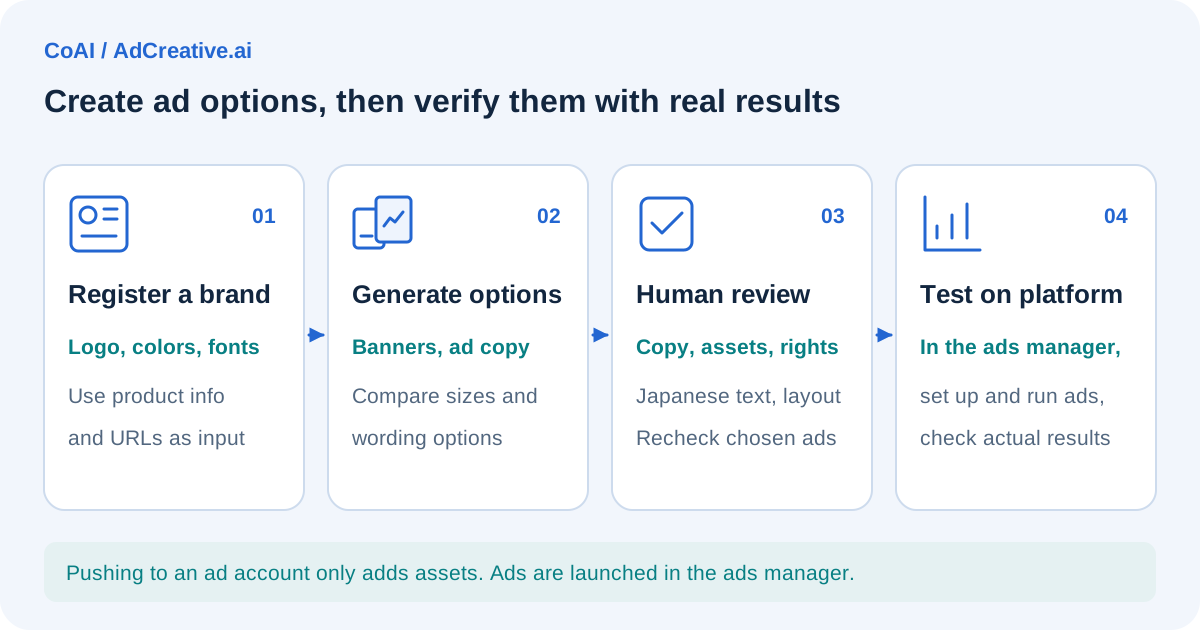
Suppose someone who runs an online shop in Japan is preparing social media ads for a new product.
- Register a brand and set the logo, brand colors, and fonts
- Load the product page URL to create ad copy options, with the person in charge polishing the Japanese wording
- Generate several banners in feed and vertical story sizes, and narrow down the options using Creative Scoring AI scores as a reference
- Download only the banners you'll use (assumed to be the point where credits are consumed) and send them to the Meta Ads media library
- Create and set up the ads in the ads manager, and judge effectiveness by the results after they run
In this flow, the scores are only a pre-launch guide. In addition, a person needs to check, separately from the tool, that the ad wording doesn't violate laws such as Japan's Act against Unjustifiable Premiums and Misleading Representations or the Pharmaceuticals and Medical Devices Act (editor's note).
How to choose among similar tools
Other tools that can create AI ad creatives and ad videos include Canva AI and Creatify. Rather than comparing each provider's specifications or prices here, we list points to consider when choosing.
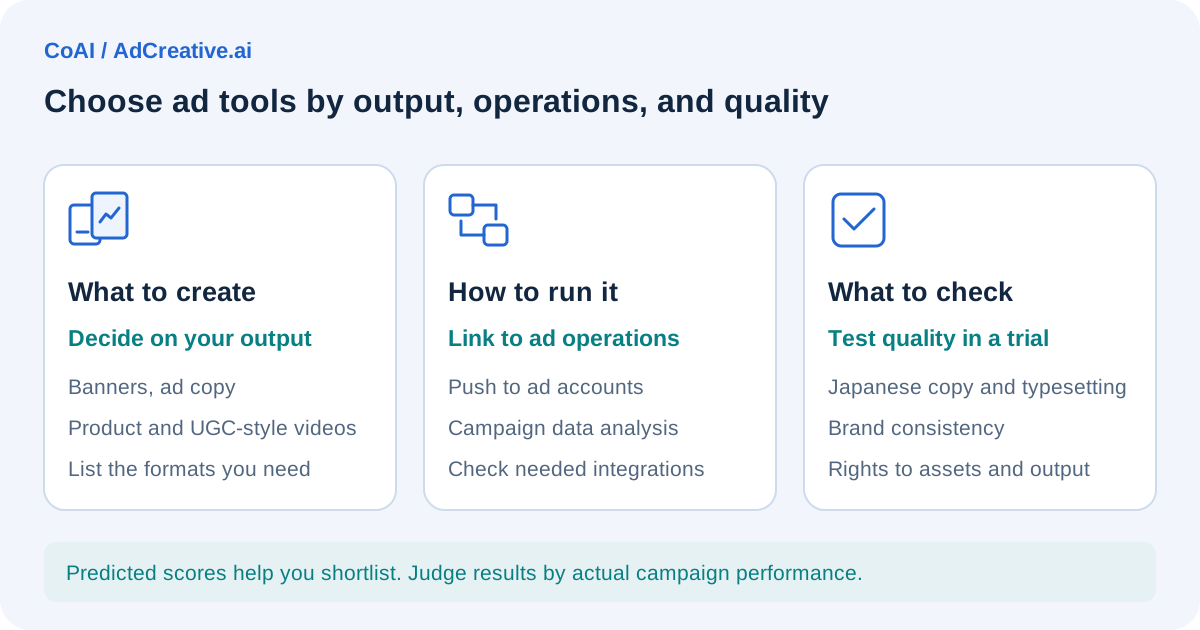
- What you mainly want to create (mostly static banners, mostly product videos and UGC-style videos, or general-purpose design)
- The billing unit, and how many creatives you need per month
- Whether you need integration with ad accounts or analysis using campaign data
- A Japanese UI, and the quality of Japanese typesetting and ad copy
- Terms on commercial use, rights to output, and the handling of customer names
- What you can try for free, and whether a credit card is required
Check each tool's official website for the latest information. You can also find an overview of AdCreative.ai on our AdCreative.ai tool page.
Frequently asked questions
Can I use AdCreative.ai for free?
There is a 7-day free trial (10 credits during the trial), but you need to enter a credit card when you sign up. We couldn't find a permanent free plan.
How much does it cost?
According to the pricing table as of October 4, 2026 (UTC), with the default number of credits on monthly billing, Starter is $39 per month (10 credits per month), Professional is $249 per month (50 credits per month), and Ultimate is $999 per month (100 credits per month). Effective monthly prices for quarterly billing (25% off) and yearly billing (50% off) are also shown, but the discounts may change, so check the final amount on the checkout screen.
Can it create ads in Japanese?
The quality of Japanese output and the typesetting of Japanese text on banners can't be judged from public information, so we recommend checking them during the trial.
Date checked and sources
The information in this article was checked on the following official pages on October 4, 2026 (UTC). Prices, specifications, and terms may change, so check the latest information before using the service.
- AdCreative.ai official website (features, pricing section, pricing FAQ)
- AdCreative.ai ad copy generation page
- AdCreative.ai AI image generation page
- AdCreative.ai terms of service (for online subscribers, English version)
- AdCreative.ai terms of service (for online subscribers, Japanese version)
- Help center: Why a credit card is required at sign-up
- Help center: Managing your plan
- Help center: Canceling your account
- Help center: Connecting ad accounts
- Help center: Connecting ad accounts to a brand
- Help center: Pushing creatives to your ad account
- Help center: What platform connections mean
- Help center: Generating creatives without connecting ad accounts
- Help center: How the ad text feature works
- Help center: How to use Creative Scoring AI