AI use is shifting from asking a question and getting an answer to handing off work and receiving progress updates and approval requests. In September 2026, OpenAI announced dots and Meta announced Muse. Grok Bot, which is included with paid Cursor plans and some other plans, and OpenClaw, a self-hosted open-source project, are increasingly compared with them as the same kind of "always-on agent."
All four keep running in the background and connect to outside apps. The real differences are whose subscription they run under, which computer they run on, and who is responsible for managing permissions. This guide sorts out those differences in three tables: pricing and usage, regional eligibility and execution environment, and permissions and approvals. It is written primarily for readers in the United States, with brief notes where Canada or the UK differ.
Bottom line: Narrow it down by your existing plans and environment
We don't rank the four products, because output quality depends on the model, the settings, and the services each agent connects to. We recommend narrowing your options in this order:
- Plans you already pay for: If you have ChatGPT Pro or Business Premium, dots is a candidate. If you have a paid individual Cursor plan, Cursor Teams, or an individual SuperGrok, SuperGrok Plus, or SuperGrok Heavy plan or X Premium+ (SuperGrok Lite is not supported), Grok Bot is a candidate. You can start dots without a new subscription once the gradual rollout reaches your account in an eligible region, and Grok Bot once your plan meets the eligibility conditions.
- Where you are: US accounts are within the dots Pro rollout. Muse is in limited testing in the US and Canada, so check whether your account has access. Grok Bot's eligibility by country has not been independently confirmed, so check with the provider. In the UK, dots Pro is excluded (Business Premium may still be an option), and Muse availability has not been established.
- Who owns the approval system: dots, Muse, and Grok Bot have approval or automatic review mechanisms built in. With OpenClaw, the operator sets them up.
Table 3, later in this guide, summarizes who each product fits best.
Background: Model names and product names are different things
- dots is an agent used inside ChatGPT, powered by a model called GPT-6 Astra (Introducing dots).
- Muse is the name of the agent. The Meta model that powers it is called Muse Spark (Meta announcement).
- Grok Bot is an app for creating and running Bots that act as AI coworkers. We treat it as separate from the Grok chat product (Grok Bot overview).
- OpenClaw is not a specific LLM but infrastructure for running an assistant. You choose the model, and it can connect to commercial models or local models (OpenClaw FAQ).
Pricing and usage: Separate the plan fee, included usage, and extra costs
Prices are the official US dollar amounts. Your actual total can include taxes depending on where you live and how you buy, so confirm the final amount at checkout or on your invoice (OpenAI Terms of Use). For Canada and the UK, OpenAI lists CAD and GBP as web billing currencies, but we have not verified local amounts; the USD figures here are not prices in Canadian dollars or British pounds. Subscriptions bought in the iOS or Android app are managed by Apple or Google and priced separately (Multicurrency billing).
| Product | What you pay for | Included usage and extra costs |
|---|---|---|
| dots | First dot included with ChatGPT Pro (US$100/$200/$500 per month) or Business Premium | Separate allowance for deeper work. Codex and ChatGPT Work tasks count toward normal usage limits |
| Muse | Free (with cap) / Power US$20/month / higher paid tier US$100/month | Paid plans include a weekly Muse token allowance (500 million / 3 billion per week) |
| Grok Bot | No standalone subscription. Included in eligible plans such as Cursor Pro (US$20/month) and Teams Standard (US$40/user/month) | Weekly allowance. After it runs out, usage continues only if on-demand is enabled |
| OpenClaw | Open source. The OpenClaw Foundation offers no paid or hosted version | Model costs (API or existing subscription) and server/maintenance costs are separate and depend on setup |
- dots: Pro pricing is listed on About ChatGPT Pro tiers. The first dot comes with the plan; it is not a separate US$100 agent fee. We did not verify Business Premium pricing. The allowance for deeper work is expanded for the first month after launch. Chatting with your dot doesn't count against ChatGPT usage limits, but Codex and ChatGPT Work tasks that your dot starts do count as usual (Introducing dots).
- Muse: The free plan also has a usage cap, and benefits vary by region and account (Muse subscription help). The listed prices are in US dollars, including for Canadian readers. We could not confirm that Muse tokens are the same unit as other providers' tokens, so don't convert between them.
- Grok Bot: The US$20 is the monthly price of the entire Cursor Pro plan, not a Grok Bot price (Cursor pricing). Linking an individual SuperGrok, SuperGrok Plus, or SuperGrok Heavy plan, or X Premium+, also grants usage (SuperGrok Lite and SuperGrok Team/Enterprise are not supported), but it doesn't stack with your Cursor plan's allowance. On-demand is enabled by default on Teams. The monthly on-demand spending cap doesn't stop a task that's already running. The free trial is a usage credit with a separate 7-day window, and large tasks can use it up quickly (Plans and billing).
- OpenClaw: "No paid or hosted version" means the OpenClaw Foundation itself doesn't offer one (OpenClaw FAQ). Costs depend on what you connect. Some setups use pay-as-you-go APIs, some route through an existing subscription such as OpenAI Codex, and some, like local models, avoid outside model charges entirely (API usage and costs). So it isn't always usage-based billing. Budget separately for server costs, electricity or hosting, and maintenance time.
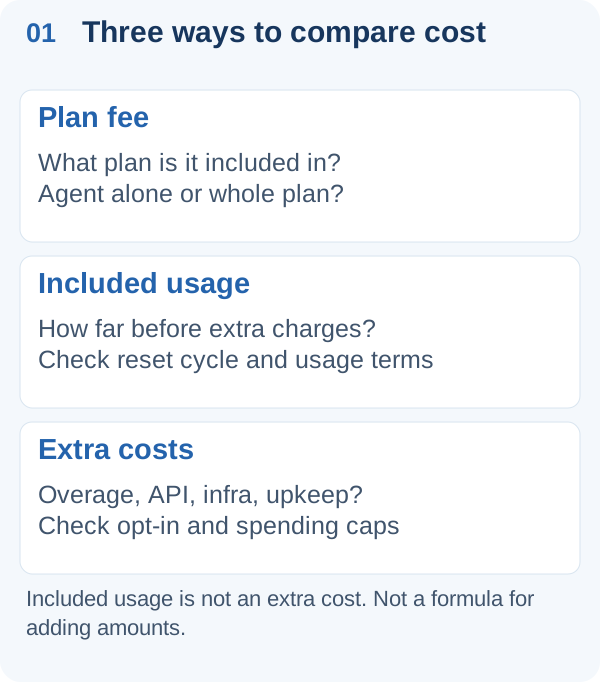
Concept diagram. It is not a formula for adding up amounts, and it does not mean included usage carries a separate charge.
Regional eligibility and execution environment
| Product | Region and eligibility | Execution environment |
|---|---|---|
| dots | Pro: excludes EEA, Switzerland, UK (US and Canada eligible) / Business Premium: all ChatGPT-supported regions. Gradual rollout | Dedicated cloud PC and browser. Connecting your own computer is optional and off by default |
| Muse | Announced for the US and Canada; limited testing, eligible accounts only. Not established in the UK or elsewhere | Muse Secure VM, with Sentinel running on the same VM |
| Grok Bot | Eligible paid plan, or a usage-credit free trial (free accounts can try it). Country eligibility list not verified | Persistent PC in Cursor's cloud, isolated per user |
| OpenClaw | You install it yourself. Each connected service's terms apply separately | Your own Mac, Linux machine, or VPS. Local or external model |
- dots: For Enterprise, Edu, and Healthcare, the beta is available only if a workspace admin turns it on; it starts off. The US, Canada, and the UK all appear on the ChatGPT supported countries list. The US and Canada are outside the Pro exclusions, so they qualify on paper, but the rollout is gradual and can take days to reach your account. In the UK, Pro is excluded, while Business Premium may be available subject to rollout. A dot can also create tasks in Codex cloud environments once you have set up an environment (help). Enterprise specialist dots are a separate pilot.
- Muse: The September 29 Muse for Small Business post says Muse is available in the US and Canada. The launch announcement, published September 8 and updated September 30, describes a US launch. According to the subscription help page, both Muse and its paid plans are in limited testing and require an eligible location and a Meta account. Being in the US or Canada doesn't mean every account has access.
- Grok Bot: Having a Cursor account or access to Grok or X where you live doesn't by itself confirm Grok Bot eligibility; check with the provider. All Bots belonging to the same user share a single cloud PC, including files and logged-in sessions, while different users are isolated from each other (Grok Bot overview). Running commands on your own computer requires a separate permission (Approvals, security, and privacy).
- OpenClaw: The model provider, chat services, and hosting provider you connect each have their own regional availability and terms. Self-hosting doesn't guarantee availability everywhere.
For this guide, we did not test whether each product actually works on individual US accounts.
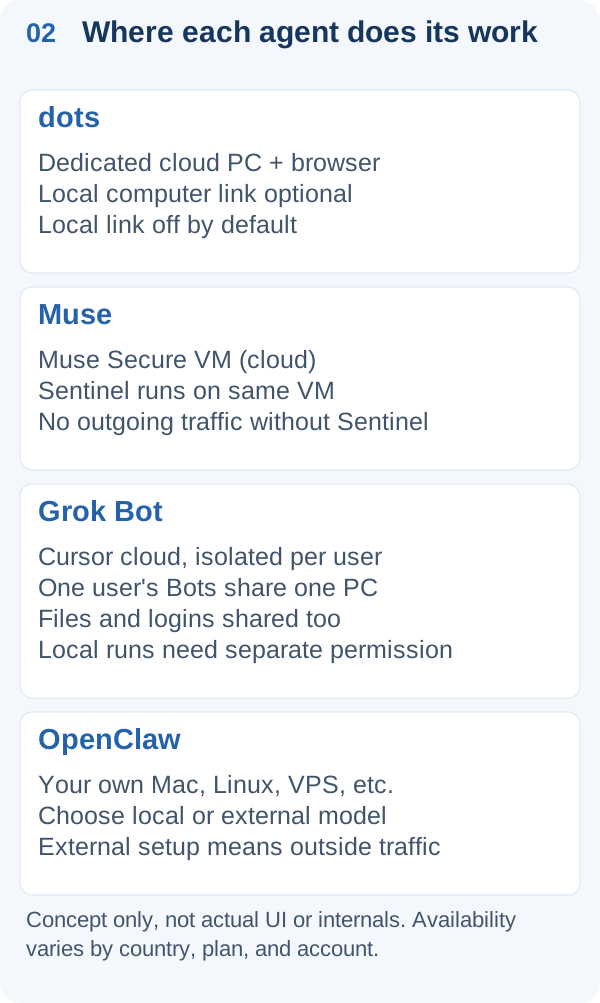
Concept diagram. It does not show actual screens or internal architecture, and it does not mean each product is available in your country.
Channels and integrations
- dots: Plugins connect it to more than 4,000 apps, and you can message it from ChatGPT, Slack, or Teams (Introducing dots). Texting by SMS is a limited beta for some US Pro users only, not all US Pro users and not Business or Enterprise. Message and data charges may apply (help).
- Muse: You talk to it in a dedicated app or on WhatsApp (Meta announcement). It connects to Canva, Notion, Shopify, Stripe, QuickBooks, Slack, Meta ad accounts, and more, and you can add custom connectors (Muse for Small Business).
- Grok Bot: It uses connectors where they exist and operates the screen directly where they don't. Demonstrate a procedure once, and the Bot can save it as a skill and rerun it on a schedule. Bots can also hand off work to one another (Grok Bot overview).
- OpenClaw: You can use Slack, Discord, Telegram, WhatsApp, Signal, and others as channels, and choose a different model for each agent. The project says OpenClaw is not an IDE replacement and recommends Claude Code or Codex for writing code directly in a repository (OpenClaw FAQ).
Permissions, approvals, and who each fits
| Product | Approvals and permissions | Best fit (editorial judgment) |
|---|---|---|
| dots | For some sharing, purchasing, and access actions, choose one of four behaviors in Custom Rules. Automatic review included. You handle things like password changes yourself | Pro or Business Premium subscribers who already work through ChatGPT, Slack, or Teams |
| Muse | No outgoing communication unless Sentinel authorizes it. Requires your approval for emails, purchases, and spending | Small businesses running social accounts or a store where Muse is offered (US/Canada testing) |
| Grok Bot | Auto Review (if enabled). Running on your own computer defaults to "Ask every time" | People with an eligible plan or trial who want role-specific Bots and accept that one user's Bots share one PC, files, and logins |
| OpenClaw | Set by the operator. One Gateway is treated as one trust boundary | People who can manage servers and credentials and want to decide where models and data live |
- dots: For proactive research, where a dot looks into things on its own in the background, it uses only read-only tools. Actions that could affect your accounts or share information go through automatic review (Introducing dots). For some sharing, purchasing, and access actions, Custom Rules lets you choose among "act without asking," "act if explicitly requested in the prompt," "ask before acting," and "hand off to you." Not every action is configurable (help).
- Muse: Sentinel is separated from Muse at the system level, and you can review a history of past actions (Meta announcement).
- Grok Bot: With Auto Review enabled, tool calls and screen actions are evaluated before they run. When an "Ask first" rule and an auto-allow rule conflict, Ask first wins. If a team admin enforces Auto Review, team rules that members can't override apply. Splitting work across Bots doesn't create a permission boundary (Approvals, security, and privacy). Enterprise plans add access, network, and audit controls (Cursor pricing).
- OpenClaw: Users who don't trust each other need separate Gateways and credentials. You can check whether your configuration has drifted from what you intended with
openclaw security audit(Security). If you configure an external model provider or chat service, data will be sent to it.
The official caveats matter too. Grok Bot's documentation says Auto Review is a model-based judgment that complements, rather than replaces, least privilege and explicit approval. OpenAI likewise asks you to review important work from dots because mistakes are possible. Whichever product you choose, a person is responsible for the final check.
Try a small task before you decide
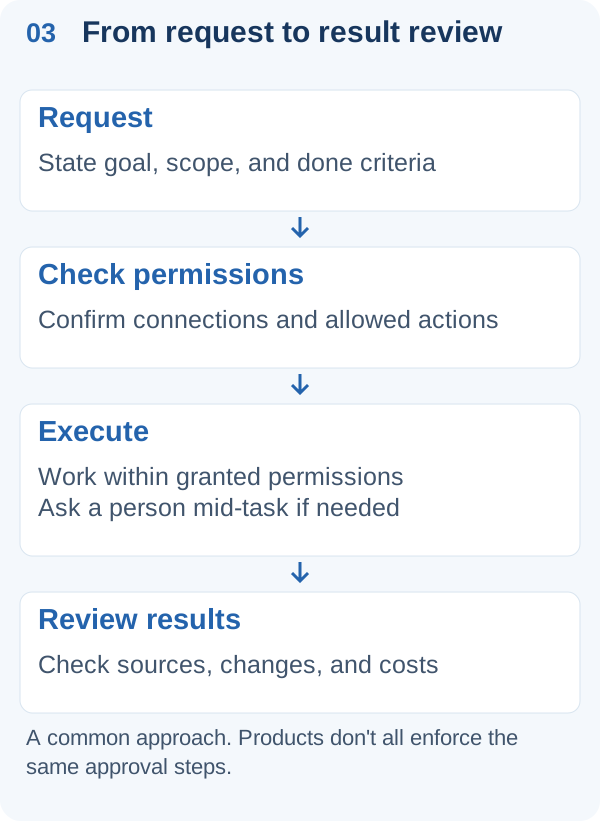
Concept diagram. It does not mean every product enforces this order or these approvals.
Rather than rolling out everything at once, the most reliable approach is to give the same small task to two candidates that are available to you where you are and compare them. If fewer than two are confirmed available for your account, for example in the UK, check eligibility first. A hypothetical task like "summarize this week's customer inquiry emails and draft replies, without sending anything" works well. Compare on these four points:
- Draft quality: How much could you use as is?
- Revisions: How many extra instructions did it need? Did it improve after the second round?
- Permissions: Could you start with read-only access? Did it reliably stop before sending or publishing?
- Total cost: Beyond the monthly fee, include overage, API or server costs, and the human time spent reviewing.
The safest path is to expand what you delegate only to a product that stays within acceptable limits on all four points.
Date checked
This guide is based on official information as of October 5, 2026. Pricing and availability may change. Before you subscribe, check the latest details on each official page linked above.