ElevenLabs is an AI audio platform built around text to speech (TTS), which converts text into spoken audio. It also offers transcription, voice cloning, dubbing, and sound effect and music generation. This article walks through its features, pricing, commercial-use conditions, and Japanese support, based on what we found on ElevenLabs' official website, help center, and documentation on October 4, 2026 (UTC).
What is ElevenLabs?
The official website presents the service in three broad areas:
- ElevenCreative: a web app for creators that produces voice, music, sound effects, images and video, and more
- ElevenAgents: a platform for building and running conversational AI agents that handle phone calls and chats
- ElevenAPI: a developer API for building speech synthesis, transcription, and other features into your own apps
This article focuses on the ElevenCreative subscriptions that individuals and small teams usually look at first, and covers the API pricing only briefly.
Main features
These are the main features we confirmed on the official pricing page and in the model list in the official documentation:
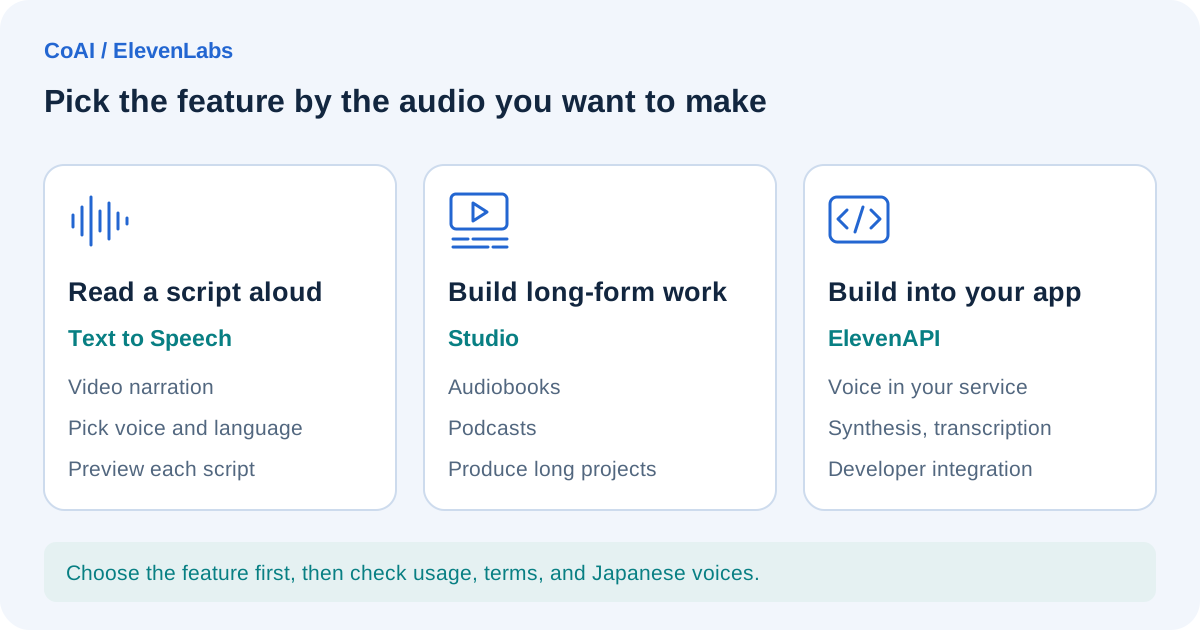
- Text to Speech: converts text into speech. Models include the latest, "Eleven v4" (the official website lists it as released in September 2026), as well as Eleven v3, Multilingual v2, and the low-latency Flash v2.5
- Studio: for creating long-form audio and video projects such as audiobooks and podcasts
- Voice cloning: Instant Voice Cloning, which creates a voice from a short sample, and Professional Voice Cloning, which trains a dedicated model on longer recordings
- Voice Design: creates a new voice from a written description of its characteristics
- Speech to Text (transcription), Dubbing, Voice Changer, Voice Isolator (noise removal), Sound Effects, and Music
There is a limit on how many characters you can generate at once. The help center puts the limit in the web interface at 5,000 characters on paid plans and 2,500 on the free plan, while the Eleven v4 introduction page says up to 10,000 characters. We could not determine from official information which limit applies when you use v4 in the web interface.
How pricing and credits work
You pay in "credits"
On ElevenCreative plans, each feature draws on "credits" that are granted every month. According to the pricing page, credits are shared across all products, so whatever you spend on one feature reduces what is left for the others. As a rough guide, the page lists Text to Speech at 1 credit per character, Speech to Text at 330 credits per minute, Music at 900 credits per minute, and Sound Effects at 200 credits per generation (all official approximations).
According to the help center, punctuation, spaces, and audio tags all count as characters. Credits are used each time you generate, not when you download, but according to the documentation, regenerations on the web version are free if certain conditions are met, for example when you regenerate within 2 hours with the same text, voice, and model.
Plan prices and monthly credits
As of October 4, 2026, the pricing page (monthly billing view) lists the following main plans. Prices are in US dollars and exclude taxes.
- Free: $0, 10,000 credits/month
- Starter: $6/month, 30,000 credits/month. Adds a commercial license, Instant Voice Cloning, and more
- Creator: $22/month, 121,000 credits/month. Adds Professional Voice Cloning and more
- Pro: $99/month, 600,000 credits/month
- Scale: $299/month, 1,800,000 credits/month, 3 seats
- Business: $990/month, 6,000,000 credits/month, 10 seats
- Enterprise: contact sales
Regular prices, first-month discounts, annual billing, and promotions
When we checked, the pricing page showed limited-time offers separate from the regular prices. All of these are as displayed at the time of checking and may change.
- First-month discounts: Starter is $1 for the first month (normally $6, shown as "Until Oct 18"), and Creator is $11 for the first month (normally $22). The discount is shown as applying to the first month only. We could not find an end date for the Creator first-month discount on the page we checked
- Annual billing: the FAQ on the pricing page explains that the annual price is "the monthly price × 10 months," which works out to two months free. The equivalent monthly prices on annual billing are $5 for Starter, $18.33 for Creator, and $82.50 for Pro. We could not confirm whether the first-month discount can be combined with annual billing
- Eleven v4 promotion: a banner at the top of the site announced "3x credits on Creator plans and above until October 12." The body of the pricing page describes a "two-week" offer in which, "on Creator plans and above, v4 Text to Speech credit usage of up to 2x your monthly credits is not deducted from your balance (web and mobile apps only)," and gives no end date. Both are limited-time offers and are not included in the monthly credit amounts above
Rollover and running out of credits
According to the pricing page FAQ, unused credits on paid plans roll over for up to two months, but they expire at the end of the billing period if you downgrade or cancel. The free plan has no rollover. The billing documentation says that new subscriptions can buy prepaid Pay As You Go credits (valid for 12 months) when they run short.
API usage has its own ElevenAPI pricing page, whose FAQ explains that it is billed in US dollars rather than credits (for example, $0.08 per 1,000 characters for Text to Speech with the multilingual models).
Commercial-use conditions
Here we summarize the help center explanation and the relevant terms. The Terms of Service (for residents outside the EEA, Switzerland, and the UK) state that free users may use the services only for non-commercial purposes, while paid users may use them for commercial purposes.
- Free plan: no commercial license is included, and it cannot be used for commercial purposes. If you publish audio created on the free plan or while not logged in, you must indicate that it was made with ElevenLabs by including "elevenlabs.io" or "11.ai" in the title (for music created with Eleven Music, the label is "Eleven Music"). The Prohibited Use Policy also lists commercial use by free users, such as advertising, among its prohibited uses
- Paid plans: every paid plan includes a commercial license. However, content created with features designated as alpha, beta, preview, or similar (Beta Services) may not be used for commercial purposes or in production. We could not determine which features currently fall into this category
- Audio created during a paid period: according to ElevenLabs, you can keep using it commercially even after the subscription ends. Audio created on the free plan before or after the paid period, however, cannot be used commercially
- Additional product-specific terms: Music, Sound Effects, Studio, Dubbing v2, and other products have their own Service-Specific Terms. For example, the Prohibited Use Policy forbids selling or distributing sounds made with Sound Effects as a standalone asset pack. The Sound Effects Terms also say that you can stop your generated sound effects from being sublicensed to third parties (including other ElevenLabs users) with the "Disable" function on the product page
As an editorial note, monetized videos, ads, and company videos published externally are likely to count as commercial use. Avoid producing them on the free plan, and check the latest terms before you start.
Voice cloning requirements
- Instant Voice Cloning: according to the billing documentation, voice cloning is available on Starter and above. The documentation recommends about 1 to 2 minutes of clean audio without noise. When creating a clone, there is a step where you confirm that you have the right and consent to replicate the voice
- Professional Voice Cloning: available on Creator and above. According to the help center, the number you can create (slots) is 1 on Creator and Pro, 3 on Scale, and 10 on Business. The recommended amount of audio is about 30 to 180 minutes (according to the FAQ in the Instant Voice Cloning documentation), and training usually takes 3 to 6 hours
- Your own voice only: Professional Voice Cloning can create only your own voice, and you cannot create someone else's voice even with their consent. Verification that you own the voice is required. If you want to use someone else's voice, the guidance is for that person to create the clone in their own account and share it
- Prohibited uses: the Prohibited Use Policy forbids intentionally replicating another person's voice without consent or legal right, and using AI-generated voices in a way that hides the fact that they were generated by AI
Note also that the Terms of Service grant ElevenLabs a license to use the content you input and generate (including voices) to provide and improve the services and to develop new services and products, and state that this license is perpetual and irrevocable. You can opt out of training use in the "Data use" setting, but the opt-out does not cover use that took place before it. The Eleven v4 introduction page, on the other hand, says that scripts and other submitted material are not used for training without consent, and we could not determine how this relates to the terms.
Japanese-language support
Here we look at two things separately: the language of the interface (UI) and the language of the generated speech.
For speech, the model list in the official documentation includes Japanese among the supported languages of Eleven v4, v3, Multilingual v2, and Flash v2.5 (Flash v2 is English only). According to the help center, the web version detects the language automatically from the input text, so it recommends not mixing multiple languages in a single input, and the API lets you specify the language with language_code. However, the sample screen on the v4 introduction page shows a "Language override" setting, so check the latest interface for how the web version currently works.
The help center explains that the language is determined by the input text, and the accent and pronunciation by the voice. Because the premade voices and generated voices are all English voices, the guidance is to look for Japanese voices with the language filter in the Voice Library or to create a clone from a Japanese recording. The Eleven v4 documentation says v4 is designed to speak naturally in a language different from that of the source voice without carrying over the original accent (a vendor claim).
For the UI, the official website has a Japanese version, including a Japanese pricing page (prices are shown in US dollars, the same as the English version). However, from the official information we checked, we could not tell whether the app screens after login can be displayed in Japanese (we found the help center only in English). It is safest to assume you will be working in an English app interface.
The most reliable way to judge Japanese pronunciation quality and how kanji and numbers are read is to listen to test output of the script you actually plan to use. The help center has articles on what to do when numbers, dates, or abbreviations are not read correctly. According to the Eleven v4 introduction page, there is also a Pronunciation Dictionary feature for specifying how words are read.
Where ElevenLabs fits and where it doesn't
The following is our editorial assessment based on the specifications confirmed in official sources.
Cases where ElevenLabs is likely a good fit:
- Producing audio from scripts on an ongoing basis, such as video narration or audiobooks
- Creating audio in multiple languages with the same voice
- Using a clone of your own voice to cut down on recording work
- Building speech synthesis into apps or conversational agents through the API
Cases where it may not be a good fit:
- Using it for ads or monetized content while staying on the free plan
- Cloning someone else's voice, such as a celebrity or coworker, without going through that person's own account
- Cases where a Japanese app interface is a must (we could not confirm one)
- Cases where video editing itself is the main goal (you would need a video editing tool in addition to voice generation)
Example workflow (illustrative, untested)
The following example is meant to explain how things work; our editors have not actually produced or tested it.
Consider adding Japanese narration to a product introduction video about 3 minutes long and publishing it externally. Because external publication may count as commercial use, this assumes a paid plan such as Starter.
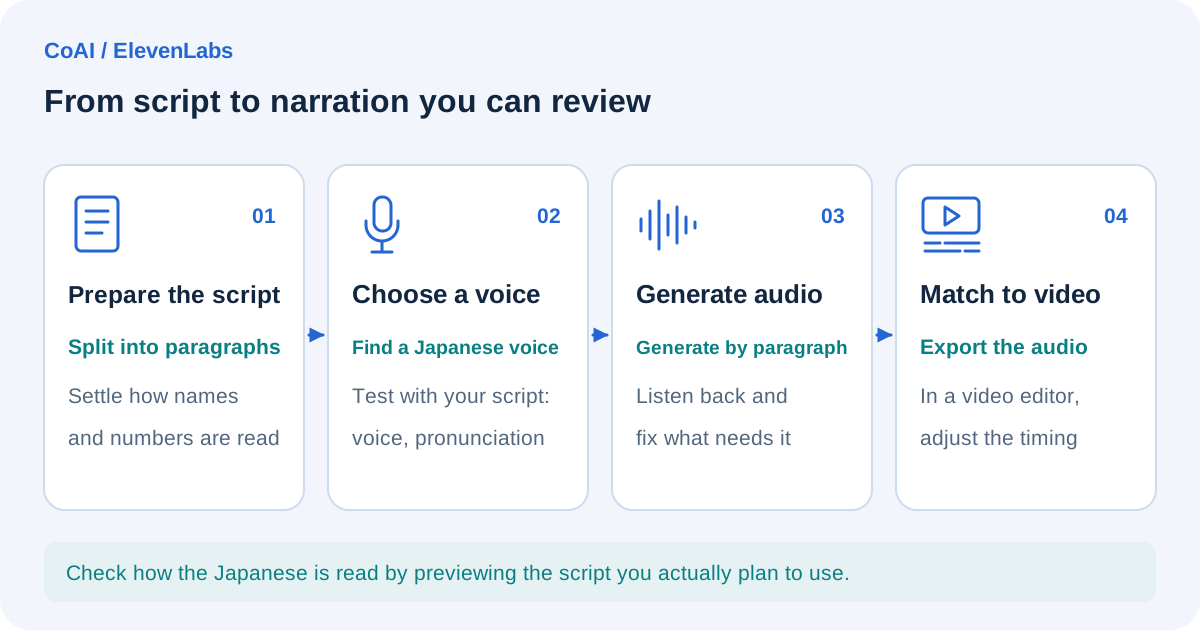
- Prepare the script: numbers and proper nouns are easy to misread, so write them in kana or set up a pronunciation dictionary as needed
- Choose a voice: find Japanese voices with the language filter in the Voice Library and preview them with your own script
- Generate: generate paragraph by paragraph and redo only the parts that don't sound right
- Finish: download the audio files and sync them to the footage in a video editing tool
Text to Speech is roughly 1 credit per character, so a 1,000-character script would use about 1,000 credits per generation (this may vary by model and route). You also need to budget credits for any regenerations.
How to choose among similar tools
Related tools include Murf AI, which offers a Studio for voiceover production and voice APIs, and Descript, an AI editor that lets you edit video and audio by editing the transcript (both descriptions are from each company's official website). This article does not compare the companies' prices or other figures.
When choosing, it helps to compare them on these points:
- Whether your main goal is generating audio, editing video and audio, or API integration
- The billing unit (credits, generation time, characters, and so on) and how much you expect to need each month
- Whether the free plan allows commercial use and whether attribution is required
- Voice cloning requirements (identity verification, eligible plans, how many you can create)
- Japanese speech quality (judge by previewing your actual script) and whether a Japanese UI is available
You can also find an overview of ElevenLabs on our ElevenLabs page.
Frequently asked questions
Is ElevenLabs free to use?
There is a free plan that grants 10,000 credits every month. However, it cannot be used commercially, and if you publish what you make, you must include "elevenlabs.io" or "11.ai" in the title.
Can I keep using audio I made during a paid period after I cancel?
According to the official documentation, audio created during a paid period can still be used under the commercial license after the subscription ends. Unused credits, however, expire at the end of the billing period.
Date checked and sources
The information in this article was checked against the following official pages on October 4, 2026 (UTC). Pricing, promotions, and specifications may change, so check the latest information before you start.
- ElevenLabs official website
- ElevenLabs pricing page (ElevenCreative)
- ElevenLabs pricing page (Japanese version)
- ElevenLabs pricing page (ElevenAPI)
- Eleven v4 introduction page
- ElevenLabs Docs: Models
- ElevenLabs Docs: Eleven v4
- ElevenLabs Docs: Billing
- ElevenLabs Docs: Account
- ElevenLabs Docs: Instant Voice Cloning
- Help center: Publishing generated content (commercial use)
- Help center: Maximum characters per generation
- Help center: How character length is calculated
- Help center: Supported languages
- Help center: Languages the AI can speak
- Help center: Selecting the language and accent
- Help center: Voices native to a specific language
- Help center: Text to Speech articles
- Help center: Number of Professional Voice Clones
- Help center: Instant Voice Cloning vs. Professional Voice Cloning
- Help center: Professional Voice Clones of someone else's voice
- ElevenLabs Prohibited Use Policy
- ElevenLabs Service-Specific Terms
- ElevenLabs Sound Effects Terms
- ElevenLabs Terms of Service (outside the EEA, Switzerland, and the UK)
- ElevenLabs Beta Services Addendum
- Murf AI official website
- Descript official website
Tools mentioned in this article
 Murf AIMurf AI is an AI voice generation service useful for narration and video production.View details
 ElevenLabsElevenLabs is an AI voice generation service that can be used for narration and dubbing.View details
 DescriptDescript is an AI video editing service that can be used for podcasts and video editing.View details