Murf AI is an AI voice generation service that turns text into natural, human-like narration. This article covers Murf AI's features, how its pricing works, the terms for commercial use, and the state of its Japanese support, based on what we found on Murf AI's official website, help center, and terms of service on October 4, 2026 (UTC).
What is Murf AI?
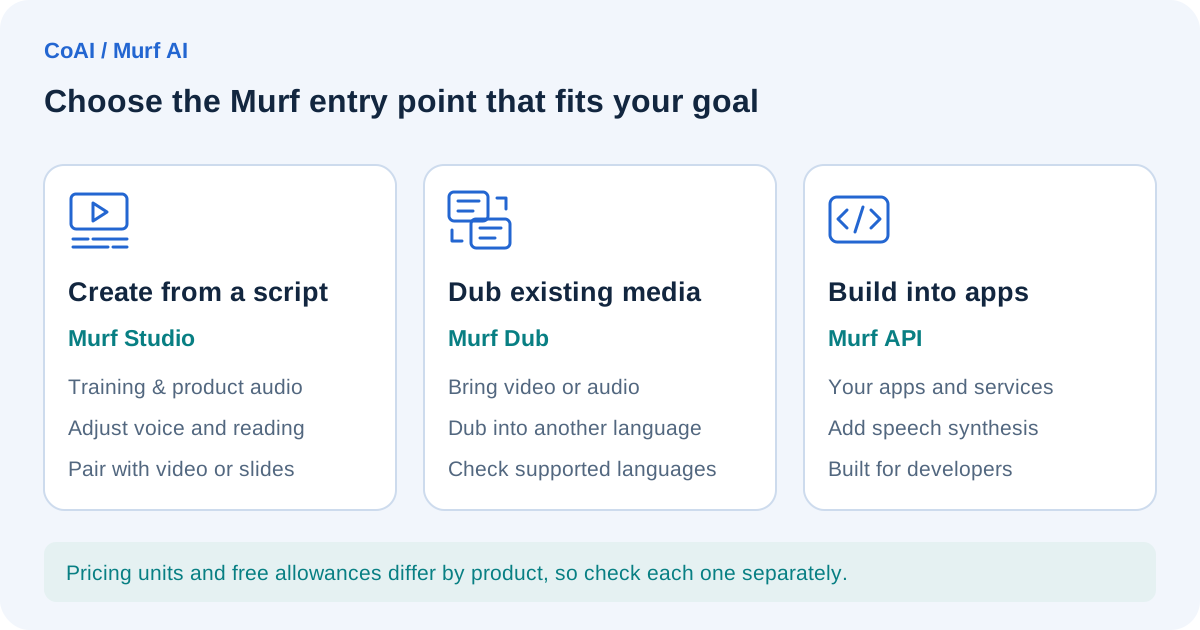
Murf AI is a voice AI service provided by Murf Inc., a US company. As of October 4, 2026, the official website presents three main entry points:
- Murf Studio: a production tool for writing a script in the browser and creating AI voiceover narration
- Murf Dub (AI dubbing): a tool for dubbing existing video or audio into another language
- Murf API: a developer service for building speech synthesis into your own apps or voice agents
The site also promotes voice agents (Agents) for businesses. The three products above each have their own pricing units and free allowances, so when people talk about "Murf's pricing," you need to be clear about which product they mean. This article focuses mainly on Studio, the tool used for producing narration.
Main features
These are the main Studio features we confirmed in the official help center:
- Generating speech from text, with controls for speed, pitch, pauses, pronunciation, and emphasis
- "Say it My Way," which lets you record your own reading as a model so the AI voice follows your intonation (a feature of the Gen2 voice model)
- "MultiNative" voices, which let a single voice speak multiple languages
- Importing images, video, and music and lining them up with the voiceover on a timeline
- Exporting audio, video, scripts, and subtitles
- Integrations with Canva, Google Slides, and PowerPoint, plus a voice installer for Windows
- Translating a Studio project into another language
The official website cites figures such as 99.38% pronunciation accuracy, along with comparisons claiming that its API model "Falcon 2" outperforms other companies' models on response speed and naturalness. These are all Murf's own claims.
As for voice cloning (reproducing a specific person's voice), the help center says it is "not self-serve and currently available only with the Enterprise plan." Keep in mind that this is not a feature individuals or small teams can use freely on screen to clone their own voices.
Pricing and limits
Studio plans and pricing
This is what the Studio tab of the official pricing page (murf.ai/pricing) showed on October 4, 2026 (UTC), in US dollars:
- Free: $0. 10 minutes of voice generation, 10 projects, 1 editor. No downloads and no commercial rights
- Creator: $29 per month on monthly billing. On yearly billing, the equivalent of $19 per month, or $228 per year. Voice generation is 2 hours per month on monthly billing, or 24 hours per year on yearly billing. 100 projects, 1 editor, unlimited downloads, commercial rights included
- Business: $99 per month on monthly billing. On yearly billing, the equivalent of $66 per month, or $792 per year. Voice generation is 8 hours per month on monthly billing, or 96 hours per year on yearly billing. Transcription is 4 hours per month on monthly billing, or 48 hours per year on yearly billing. 500 projects, 1 editor, Business License included
- Enterprise: custom quote. Unlimited voice generation, with the number of projects and editors set individually. Broadcasting rights (Full Broadcasting Rights) are listed as an add-on and marked as unavailable on Creator and Business
On yearly billing, the pricing page shows voice generation time as an amount "per year." We could not confirm from the pricing page whether a fixed amount is granted each month on yearly billing. We did not check taxes, regional differences, or the amounts shown at actual checkout, so check the latest prices on the official pricing page and at checkout before you sign up.
The help center articles refer to Studio plans named "Creator," "Growth," and "Enterprise," which does not match "Business" on the pricing page. The plan lineup may have changed, but we could not find an official explanation. The help center says both monthly and yearly billing are available, and that upgrades to a higher plan or to yearly billing are prorated. The FAQ on the official homepage says monthly plans are available and renew automatically. The terms of service say you can avoid future charges by canceling before the renewal date, and the help center recommends canceling at least one day before renewal. Cancellation takes effect at the end of the current billing period, and you can keep using paid features until then.
Billing is based on "voice generation time (VGT)"
In Studio, the length of the audio you generate is deducted from your "voice generation time" (VGT). Here are the key points from the help center:
- When you generate a new sub-block (a segment within a block), or change the text of an existing sub-block and regenerate it, VGT equal to the length of the entire sub-block's audio is consumed
- Changing the voice, style, pitch, speed, pauses, emphasis, pronunciation, volume, and similar settings while keeping the same text does not consume VGT
- As a rough guide, a 1,000-word English script comes to about 6 minutes (an estimate that varies with the script, voice, and speed)
We could not find official information on how Japanese character counts translate into generation time. For Japanese scripts, the reliable approach is to check the actual length using the free trial (editor's note).
According to the help center, unused VGT carries over to the next billing period once, and only if the plan auto-renews or is paused. If you cancel, or if the plan is not renewed because a payment fails, the carried-over time is lost.
What you can and can't do on the free trial
According to the help center, new sign-ups automatically receive a free trial. The main terms are:
- 10 minutes of voice generation time and 10 minutes of transcription
- No audio downloads (you can share a project preview and use an embed link)
- No credit card required
- No set expiration; the trial ends once the 10 minutes are used up
The FAQ on the official homepage also says the free tier does not include a commercial license and that audio downloads are available only on paid plans. In other words, the free trial is a way to try out the voices and how the tool feels, and using finished audio for work assumes a paid plan.
In addition, the terms of service say you can request a refund only within 24 hours of purchase and only if you have used less than 10 minutes of voice generation time. Other payments are, as a rule, non-refundable.
AI dubbing and the API are priced separately
AI dubbing (Murf Dub) uses its own credit system, separate from Studio. According to the help center, the free trial includes 200 credits, watermarked exports, and up to 1 project, and pay-as-you-go pricing is $1 per credit (minimum purchase of $5). Automated dubbing consumes 2 credits per minute of file per language, with the length rounded up to the next 30 seconds.
Murf API also has its own pricing, separate from Studio subscriptions. The help center describes a free API trial of 100,000 characters. For pay-as-you-go rates, the API tab of the official pricing page and the help center's pay-as-you-go article list "Gen 2: $0.03 per 1,000 characters" and "Falcon (Falcon 2 on the pricing page): $0.01 per 1,000 characters." The pricing page's API tab also showed rates for the voice changer ($0.1 per minute) and translation ($0.02 per 1,000 characters). However, the official homepage and the Falcon introduction page describe Falcon 2 as "$0.01 per minute," a per-minute rate, so the units do not match. The minimum purchase also appeared as both $2 and $10 in different help center articles. If you plan to use the API, check the latest pricing before signing up. All of these amounts are separate from Studio plan pricing.
The Product-Specific Terms also say that credits prepaid for the API and AI dubbing are non-refundable and expire one year after the purchase date unless otherwise specified at the time of purchase. They also say that the character count billed for the API includes spaces and punctuation.
Terms for commercial use
The official pricing page, help center, and terms of service describe commercial use as follows:
- Audio created in Studio on a paid plan comes with commercial rights, and you can monetize it on YouTube and elsewhere (provided the script is original and does not infringe copyright)
- The free trial (free tier) does not include a commercial license
- The pricing page FAQ describes the Personal License as intended for individuals' personal use and small-scale commercial projects, and the Business License as designed for businesses and organizations and recommended for corporate use. Registered businesses are recommended to choose Business over Creator. These are written as recommendations, not as rules prohibiting corporate use on Creator
- "Broadcasting rights" for use on TV networks or radio stations are available only on the Enterprise plan (the pricing page also shows them as an Enterprise add-on)
- Commercial rights to audio you have already created continue after you cancel a paid plan
- Under the terms of service, commercial rights are not resale rights, and reselling Murf's voice library to third parties or using Murf voices to train AI models is prohibited
Note that the Japanese voice introduction page says, in effect, that audio from paid plans can be used commercially, including for broadcast (while adding that you should check your plan's license terms for details). The help center, on the other hand, says broadcasting rights are limited to Enterprise. If you plan to use the audio on TV or radio, confirm with Murf before signing up. The AI voice policies of YouTube and other platforms may also change, so check the terms of the platforms you publish on as well.
For voice cloning, the terms of service require explicit written consent from the owner of the voice and prohibit submitting recordings of third parties for training without their consent.
Japanese-language support
Here we look separately at the display language of the interface (UI) and the input and output of voice and text.
For voice input and output, we confirmed that Japanese is a supported language in the help center's list of supported languages and on the official Japanese voice introduction page. The Japanese page shows how to enter a Japanese script and generate audio, along with examples of Japanese voices (such as Kei, Sakura, Reo, and Itsuki). Japanese also appears in the AI dubbing language table (two columns: source language and dubbing target). The order of the table suggests Japanese is in both columns, but the column structure of the table we retrieved was broken, so we could not confirm this. If you plan to dub from Japanese into other languages, or from other languages into Japanese, check the official page.
The number of supported languages and voices varied from page to page, with figures such as "35+ languages," "33 languages," "40+ languages," "200+ voices," and "300+ voices." We also could not pin down a consistent official number of Japanese voices. Rather than relying on any particular figure, we recommend using the free trial to check whether the voice you want is available. It's also a good idea to listen for Japanese reading quality (pitch accent and how kanji are read) at the same time.
On the other hand, we could not confirm from the official information we consulted whether the Studio interface can be displayed in Japanese. The help center pages we retrieved were also in English. It is safest to plan on working in an English interface.
Where it fits and where it doesn't
The following is the editorial team's assessment based on the specifications we confirmed in official information.
Cases where it is likely to be a good fit:
- When you want to remake narration for internal training, e-learning, or product explainer videos as the script changes (because changing voice settings does not consume VGT)
- When you want to add a voiceover to materials made in PowerPoint or Canva
- When you want to create multiple language versions with the same voice (MultiNative voices)
- When you want to try localizing existing videos into multiple languages on a small, pay-as-you-go scale (AI dubbing)
Cases where it may not be a good fit:
- When you want to download and use finished audio without paying (the free trial does not allow downloads)
- Individuals who want to clone their own voice easily (Enterprise only)
- When you plan to broadcast on TV or radio but are not considering an Enterprise contract
- When a Japanese-language interface is a must
Example use (illustrative, not tested)
The following example is meant to explain how the service works; the editorial team has not actually created or tested it.
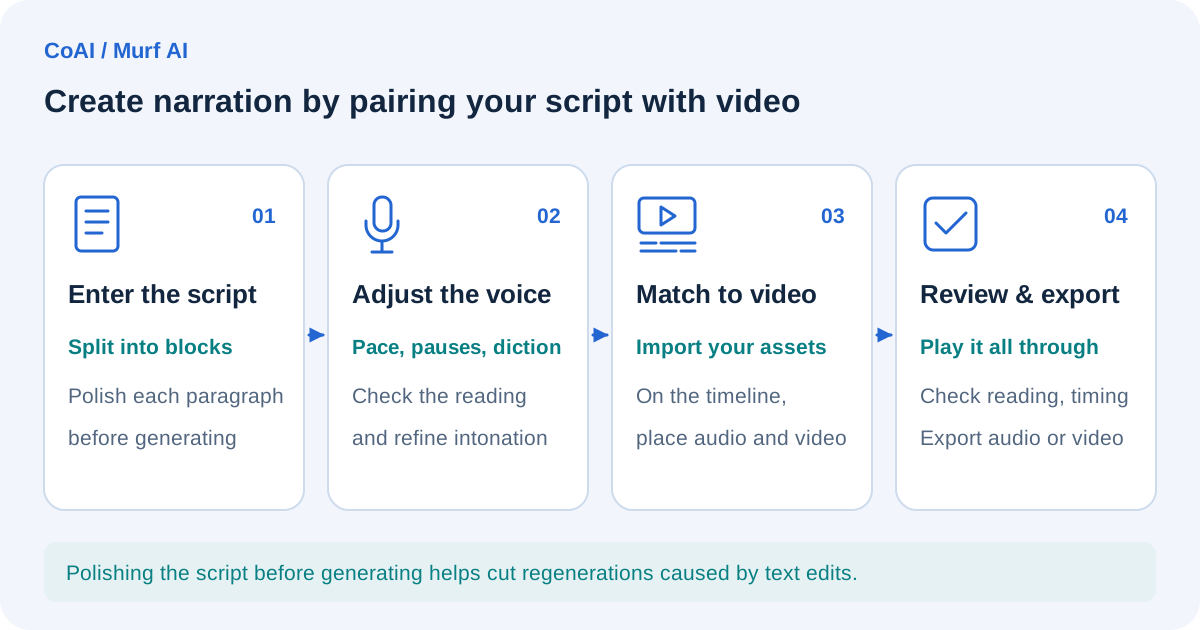
Consider adding Japanese narration to an internal information security training video (about 5 minutes):
- Listen to several Japanese voices on the free trial and narrow down the candidates (downloads aren't available, so decide based on the preview)
- Sign up for a paid plan and enter the script, split into blocks by paragraph
- Adjust how internal terms and product names are read using the pronunciation settings (adjustments that keep the same text don't consume VGT)
- Import the slide images, line them up with the audio on the timeline, and export as a video
- If you revise the script, additional VGT is consumed only for the length of the revised sub-blocks
In this flow, the more often you rewrite the script, the more VGT you consume. Finalizing the script before generating makes it easier to keep consumption down.
Choosing between Murf AI and ElevenLabs
One AI voice generation tool you might compare Murf AI with is ElevenLabs. We have not checked ElevenLabs' specifications or pricing against official information for this article, so we don't compare specific figures. When choosing, it helps to compare the latest official information from both companies on the following points:
- The billing unit (length of generated audio, character count, or credits) and the rules for carrying over unused amounts
- Whether you can download audio on the free tier, and whether you can use it commercially
- Whether you can create a voice clone yourself, and from which plan
- How broadcast use and business licenses are handled
- Whether the Japanese voice you want is available, and whether you're satisfied with the Japanese reading quality
- Whether a Japanese interface is available
- Whether you'll use it as a production tool or build it in through the API
You can also find an overview of Murf AI on our Murf AI tool page.
Frequently asked questions
Can I use Murf AI for free?
There is a free trial (the Free plan on the pricing page) that lets you try 10 minutes of voice generation time. The help center says it also includes 10 minutes of transcription. However, you can't download audio, and no commercial license is included. You need a paid plan to use finished audio.
How much do the paid plans cost?
As of October 4, 2026 (UTC), the official pricing page showed Creator at $29 per month on monthly billing (the equivalent of $19 per month on yearly billing, or $228 per year), Business at $99 per month on monthly billing (the equivalent of $66 per month on yearly billing, or $792 per year), and Enterprise as a custom quote. We did not check taxes or the amounts shown at checkout, so check the latest prices on the official pricing page before you sign up.
Does redoing voice adjustments use up time every time?
According to the help center, changing the voice, pitch, speed, pronunciation, and similar settings while keeping the same text does not consume time. If you add or edit text and regenerate, the length of that entire sub-block is consumed.
Can I still use the audio I created commercially after canceling?
The help center says commercial rights to audio you have already created remain valid after cancellation. However, any unused voice generation time (including carried-over time) is lost when you cancel.
Can I use it in Japanese?
Japanese voice generation is supported. We could not confirm in our review whether the interface can be displayed in Japanese.
Date checked and sources
The information in this article was checked on the following official pages on October 4, 2026 (UTC). Prices and specifications may change, so check the latest information before using the service.
- Murf AI official website
- Murf AI official pricing page
- Murf AI Japanese text-to-speech page
- Murf Falcon introduction page
- Murf AI Terms of Service
- Murf AI Product-Specific Terms
- Murf AI Legal Hub
- Help Center: Murf products
- Help Center: Free trial features
- Help Center: How long the free trial lasts
- Help Center: How voice generation time (VGT) works
- Help Center: VGT validity
- Help Center: VGT carry-forward conditions
- Help Center: Upgrading a subscription
- Help Center: Canceling a subscription
- Help Center: Commercial rights
- Help Center: Commercial rights after cancellation
- Help Center: Voice cloning
- Help Center: Languages and accents
- Help Center: Working with the Studio
- Help Center: Exporting scripts
- Help Center: AI dubbing pricing
- Help Center: AI dubbing credit consumption
- Help Center: AI dubbing supported languages
- Help Center: API plans and limits
- Help Center: API pay-as-you-go