
n8n is a workflow automation tool that connects web services and APIs to automate business tasks. This article walks through n8n's features, pricing, limits, and where it does and doesn't fit, based on what we found on n8n's official website and documentation on October 4, 2026 (UTC).
What is n8n?
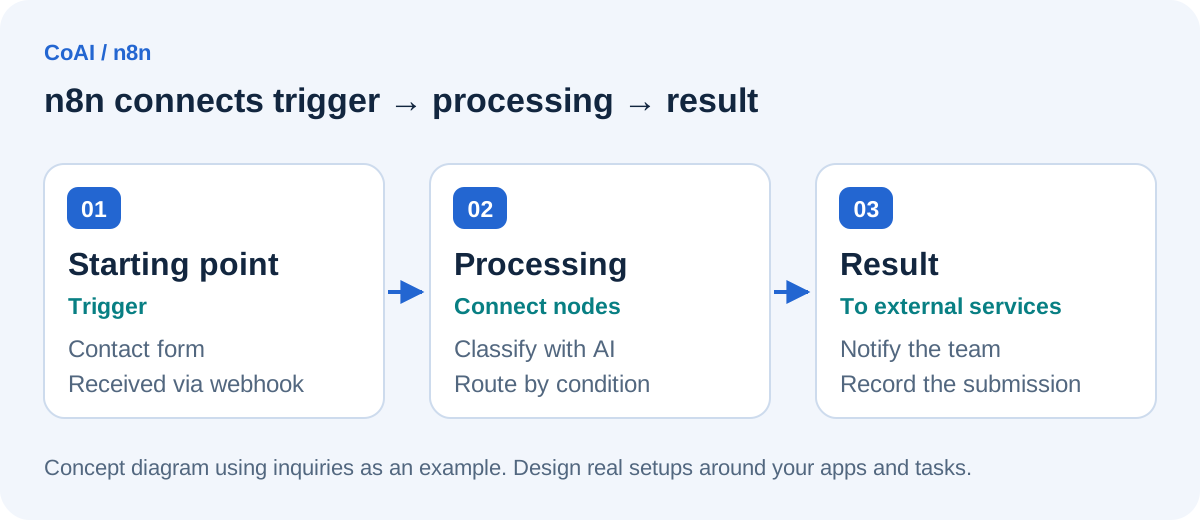
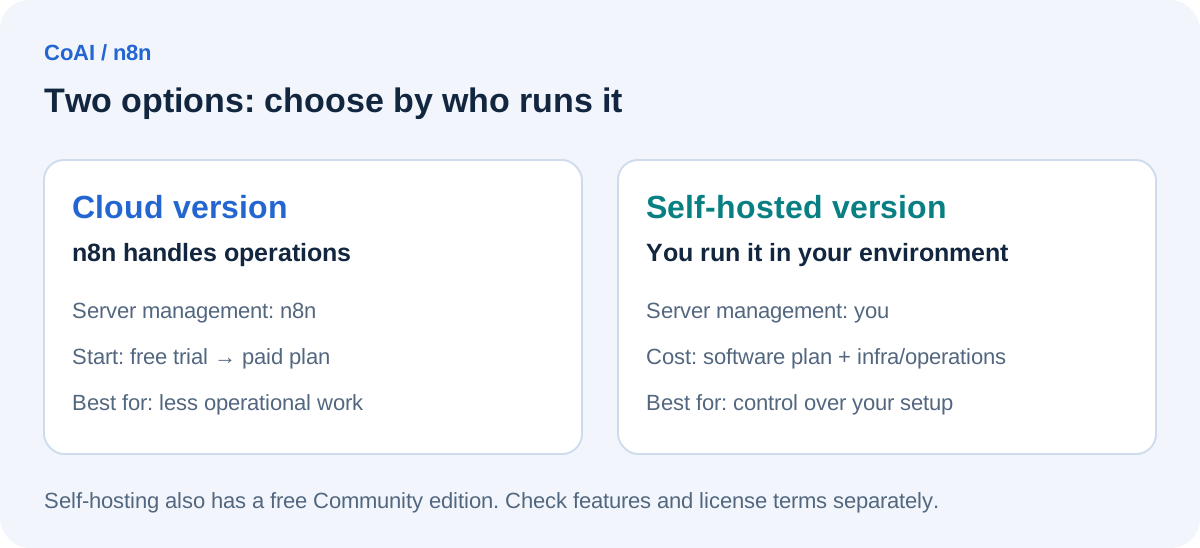
n8n lets you build workflows by connecting "triggers" (what starts a workflow) and "nodes" (what processing it does) on a canvas. It comes in two main forms: a cloud version operated by n8n, and a self-hosted version that you run on your own servers or similar infrastructure.
According to the official pricing page, every plan includes unlimited users and unlimited workflows, along with access to all integrations.
Main features
These are the main features we confirmed on the official pricing page and in the documentation:
- Integration nodes for a wide range of services, plus API connections through HTTP requests and webhooks
- The Code node, which lets you write logic in JavaScript or Python
- Nodes for AI agents, chains, memory, and vector stores that connect to LLM providers such as OpenAI, Anthropic, and Google
- Integration with MCP (Model Context Protocol) servers
- Workflow execution history you can review
One of n8n's defining traits is that it is built around no-code visual editing while letting you write code only where you need it. Because the AI nodes connect to external LLM providers, those services may charge usage fees separately from n8n's own pricing (editor's note).
Pricing and how "executions" work
You pay per workflow execution
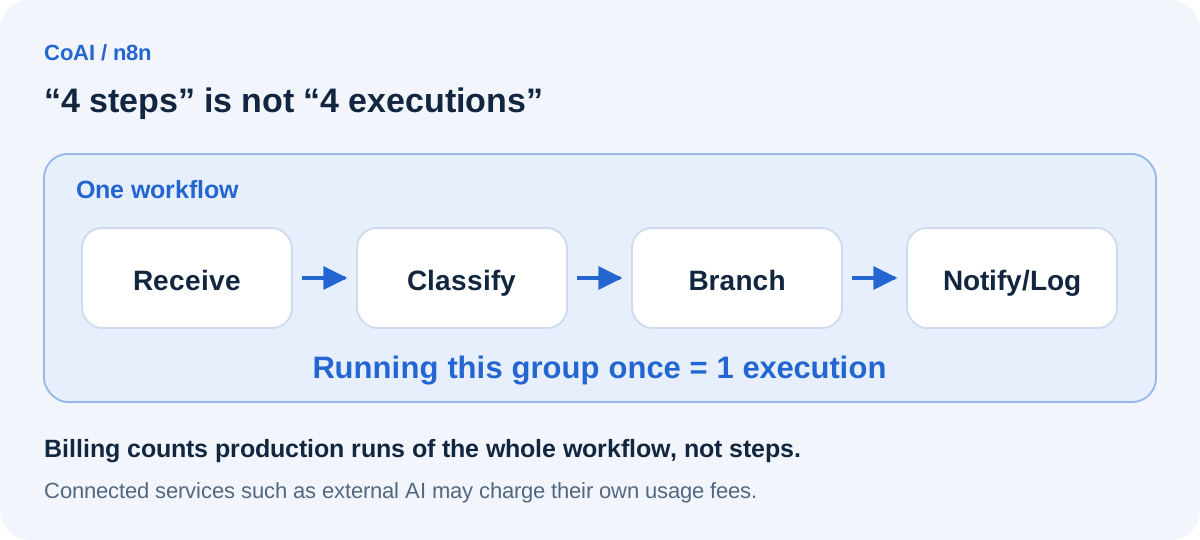
n8n's pricing is based on the number of executions. The official pricing page defines one execution as "one run of the entire workflow" and counts it as one regardless of how many steps the workflow contains or how much data it processes.
The documentation further explains that only production executions started automatically by a trigger, a schedule, or polling count toward your limit. The following are described as not counting:
- Manual executions (test runs) from the editor
- Sub-workflow executions (only the parent execution counts)
- Error workflow executions
- Polls that find no new data
- Webhook requests that fail or are rejected before the workflow starts, for example because they are malformed
Paid plans at a glance
As of October 4, 2026, the official pricing page (annual billing view) lists the following main plans. Prices are in euros and shown as the monthly price when billed annually. Monthly-billing prices were outside the scope of what we checked for this article, so please see the official page for those.
- Starter: €20/month (billed annually), 2,500 executions/month, 5 concurrent executions
- Pro: €50/month (billed annually), 10,000 executions/month, 20 or 50 concurrent executions depending on the tier you choose
- Business: €667/month (billed annually), 40,000 executions/month; available self-hosted only as of October 4, 2026
- Enterprise: contact sales (cloud and self-hosted)
The documentation explains that on the cloud version, production executions that exceed the concurrency limit are queued and processed in order. Saved execution history is also limited: the pricing page lists a retention period of 7 days for Starter and 30 days for Pro.
Free trial and self-hosted version
The cloud version offers a free trial. According to the official documentation, it lasts 14 days and lets you try Pro plan features, but it is capped at 1,000 executions and runs on Starter-level compute. The official pricing page also lists 5 concurrent executions, a 180-second execution timeout, and one project. The trial is not a permanent free plan: if you don't upgrade, your workspace is deleted after the trial expires (workflows can still be downloaded for 90 days after expiry).
The self-hosted version, on the other hand, has a free Community edition that runs without a license key. As an editorial note, self-hosting means you are responsible for providing servers and handling updates, backups, and security. The documentation also lists features that are not available in the Community edition, including projects, SSO (SAML/LDAP), workflow and credential sharing, Git-based version control, environments, and external secrets management.
Limits to check before business use
Before using n8n for work, we recommend checking the following points against primary sources.
- License: The source code in n8n's official repository is provided under the "Sustainable Use License" (files with ".ee" in their file or directory name fall under a separate Enterprise License). The license allows use and modification for your own internal business purposes or for non-commercial or personal use, while allowing you to distribute the software or make it available to others only for non-commercial purposes and free of charge. If your use goes beyond internal use, such as offering customers a service that embeds n8n, review the license terms and contact n8n if needed.
- Code node on the cloud version: According to the official documentation, the cloud version allows only a limited set of JavaScript modules (crypto and moment), and Python cannot import any libraries, including the standard library. Anything that requires importing libraries assumes a self-hosted setup configured for it.
- Data location: The official pricing page states that cloud data is stored in the EU, on servers in Frankfurt, Germany. If your internal policies restrict where data may be stored, check this first.
- Support: Starter and Pro come with forum (community) support, while dedicated support with an SLA is part of the Enterprise plan.
Using n8n in other languages
Here we look at two things separately: the language of the interface (UI) and the language of the data you work with.
For the UI, the official documentation describes an environment variable (N8N_DEFAULT_LOCALE) that sets the UI language on self-hosted instances, and explains that untranslated strings are displayed in English. However, in the translation-file directory we checked in the official repository, we could confirm only English files, so we could not confirm that the UI is officially available in any other language. It is safest to assume you will be working in an English interface.
For input and output, n8n passes text along as data, so it should be possible to build workflows that handle email bodies or spreadsheet values written in other languages. However, the quality of summaries or classifications in those languages depends on the AI or external services you connect. This is our editorial view, and we have not tested it on a real setup.
Where n8n fits and where it doesn't
The following is our editorial assessment based on the specifications confirmed in official sources.
Cases where n8n is likely a good fit:
- Workflows with many steps per run (paid plans such as the cloud plans bill per execution, so the number of steps is less likely to drive costs directly)
- Integrations that use APIs or webhooks, or cases where you want to handle part of the logic in code
- Cases where you want to keep it in your own environment, for example because of internal policies (self-hosted version)
- Cases where you want to build AI agents or LLMs into business workflows
Cases where n8n may not be a good fit:
- Teams uncomfortable with an English interface and technical terminology who require a UI in another language
- Running the self-hosted version in production without the capacity to operate servers
- Offering a service that embeds n8n to third parties without having checked the license terms
Example workflow (illustrative, untested)
The following example is meant to explain how things work; our editors have not actually built or tested it.
Consider a flow that receives contact form submissions through a webhook, classifies them with an AI node, notifies the responsible team in a chat tool, and records them in a spreadsheet.
- Webhook trigger: receives the data when the form is submitted
- AI node: classifies the inquiry as "Quote," "Support," or "Other" (requires an API key for an external LLM)
- Conditional branching node: routes the notification based on the classification
- Chat tool node: notifies the responsible team
- Spreadsheet node: records the submission
Under the official definition, each production run of this flow counts as one execution, even though it contains multiple steps. Test runs while editing don't count toward the limit. On the other hand, the service the AI node connects to may charge separate usage fees.
Choosing between n8n, Make, and Zapier
The three tools take different approaches to billing. According to each company's official pricing page, n8n bills by the number of executions of an entire workflow, Make by "credits" consumed for each module action in a scenario (most actions use 1 credit), and Zapier by "tasks" counted for each successful step (Zapier states that triggers don't count as tasks).
When choosing, it helps to compare them on these points:
- The number of steps per run and the expected number of runs per month
- Whether you need to keep it in your own environment (whether you need self-hosting)
- Whether you need to work directly with code or APIs
- Whether you need a UI in a language other than English
- Whether each tool offers the integrations you need
Which tool ends up cheaper depends on how your workflows are built and how often they run. Estimate your actual usage first, then compare using each company's latest pricing page. You can also find overviews of each tool on our n8n, Make, and Zapier pages.
Frequently asked questions
Is n8n free to use?
The cloud version offers a 14-day free trial, but it is not a permanent free plan. The self-hosted Community edition is free to use, but server costs and operational effort come on top of that, and your use must stay within the license terms.
Do test runs count toward executions?
According to the official documentation, manual executions from the editor don't count toward the limit. What counts are production executions started automatically, for example by a trigger.
Can I use it in languages other than English?
You should be able to build workflows that handle text in other languages, but in our check we could not confirm an officially provided UI in any language other than English. Plan on working in an English interface.
Date checked and sources
The information in this article was checked against the following official pages on October 4, 2026 (UTC). Pricing and specifications may change, so check the latest information before you start.
- n8n official pricing page
- n8n Docs: How executions work
- n8n Docs: Cloud free trial
- n8n Docs: Cloud concurrency
- n8n Docs: Self-hosting
- n8n Docs: Community edition features
- n8n Docs: Webhook node
- n8n Docs: HTTP Request node
- n8n Docs: Code node
- n8n Docs: AI integration
- n8n Docs: Time zone and localization
- License in the n8n official repository (Sustainable Use License)
- Translation files in the n8n official repository
- Make official pricing page
- Zapier official pricing page
Tools mentioned in this article
 n8nn8n is an AI business automation service useful for workflow automation and AI agents.View details
 MakeMake is an AI business automation service useful for workflow automation and data integration.View details
 ZapierZapier is an AI business automation service useful for workflow automation and sales.View details