Screenshots show the official pages on the capture date and may differ from the pages at publication. Select an image to enlarge it.
On November 20, 2026 (US time), Anthropic began offering "computer use," which lets Claude look at a user's computer screen and operate permitted desktop apps, in beta on its Team and Enterprise business plans. The feature had been available as a "research preview" on the individual Pro, Max and Ultra plans since March 2026, and it now extends to plans purchased by organizations. It is rolling out to organizations gradually.
What it can do
With computer use, Claude takes screenshots to understand what is on the screen and then clicks, types and navigates on the user's behalf. It can open files and carry out tasks across multiple apps. Anthropic says Claude chooses how to get work done in this order: first connections to external services (connectors), then the browser, and finally direct control of the screen. It notes that screen control takes longer than connectors.
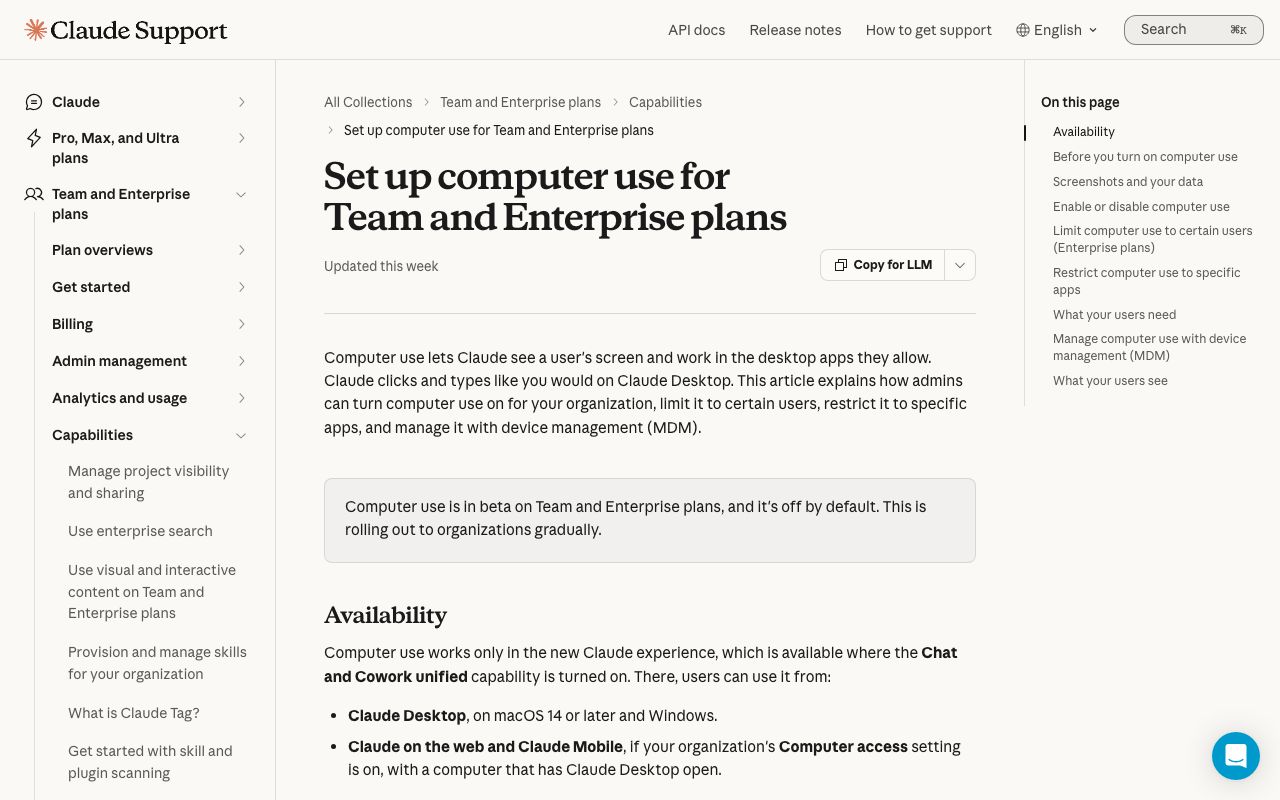
It is available in the "new Claude" interface, which combines chat and the collaboration feature Cowork. It runs in the desktop app (macOS 14 or later and Windows), and if the organization's "Computer access" setting is on, it can also be used for tasks requested from the Web or the mobile app. In every case, however, the computer being controlled must be on with the desktop app open. On macOS 15 or later, Claude works in a background window, so users can keep working without losing control of their mouse and keyboard.
Settings for administrators
On Team and Enterprise plans, computer use is off by default. Only organization owners (Owner or Primary Owner) can turn it on, from "Capabilities" in the organization settings. As a prerequisite, the setting that combines chat and Cowork (Chat and Cowork unified) must be turned on first.
The main controls available to administrators are as follows.
- Limiting who can use it: on the Enterprise plan, permissions can be set separately for each custom role
- Limiting apps: there are settings to block specific apps and to allow only specified apps (changes take about an hour to apply)
- Device management: the feature can be disabled per computer through MDM (a system for managing company computers centrally)
On the other hand, computer use is not available in HIPAA-compliant configurations (for health-information regulations), in organizations with a zero data retention agreement for Claude Code, in organizations that use customer-managed encryption keys, or in some settings for educational institutions.
Safeguards
Claude asks the user for permission before using an app for the first time. By default, browsers and many investment, trading and crypto apps are set to "can view, but cannot click or type," terminals and code editors are set to "can click and scroll, but cannot type," and music, video streaming and e-book apps cannot be controlled at all. There is also a system for detecting malicious instructions hidden in screen content (prompt injection), and when actions are set to be approved automatically, an automatic check runs before they are carried out.
As a caution, Anthropic explicitly notes that screenshots may contain personal or confidential information, and that the automatic check can see the most recent screenshot, a copy of which Anthropic may keep in its record of that check. Data is handled according to the commercial terms of service and data processing agreement. No regional restrictions are mentioned, and Anthropic has not officially stated whether organizations in Japan can use it.
A new design for the mobile app
On the same day, November 20, a new design for the Claude mobile app also began rolling out. It is rolling out gradually, starting with iOS, and requires iOS 26 or later. Existing chats and projects carry over as they are. No timing has been given for Android.
CoAI's take
One company after another is rolling out features that let AI operate apps on a computer. On November 19, the day before, Google added computer use to the Gemini app for Mac (Google Adds "Computer Use" to Gemini for Mac). Google's rollout starts with English-language users on paid individual plans in the US. OpenAI also offers a similar feature in ChatGPT Work and Codex in supported regions. Claude's announcement is not about a new ability to control computers; its core is bringing a feature that already existed for individuals to businesses, in a form where administrators decide who can use it and which apps it can use.
For companies, it is worth checking before adoption that screenshots may be retained on Anthropic's side and that organizations with a Claude Code zero data retention agreement cannot use it. Since it is a beta, a sensible approach is to start with a limited set of teams and apps, and to have a person review the details before actions that are hard to undo, such as sending messages or making payments.